5282 - A/P Vendor Misc
Fees Defaults Maintenance
The A/P miscellaneous fees process
was created to charge certain vendors various fees on the vendor’s invoices to
BWI. The fees are processed as
deductions from the amount the vendor charges BWI on an invoice.
Before a vendor can be charged a fee
on their invoices, the miscellance fees have to be setup, and the appropriate
fees assigned to the necessary vendors.
The Maintenance screen is used to set up valid miscellaneious
invoice fee types. These are the fee
types that can be assigned to an A/P vendor to deduct from vendor
invoices. A miscellaneous fee must be
set up in the 5282 option before that fee type can be assigned to a vendor.
When option 5282 is taken the initial
maintenance screen displays with the current fee types listed.
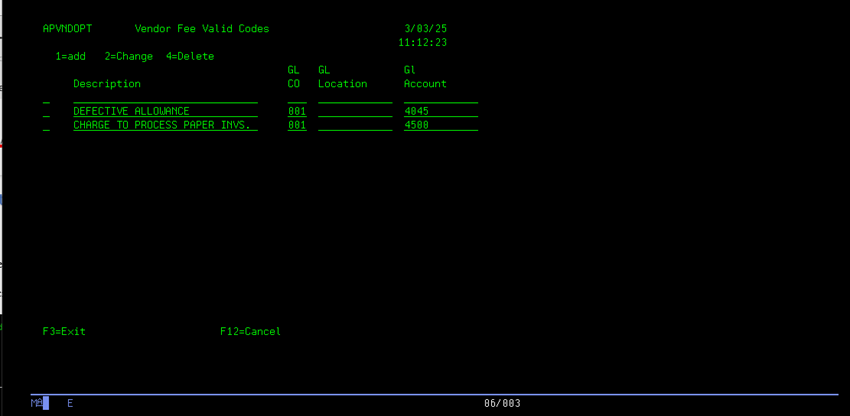
To add an new miscellaneous fee,
enter a ‘1’ in the option field for the Blank fee type line, then enter the
required data.
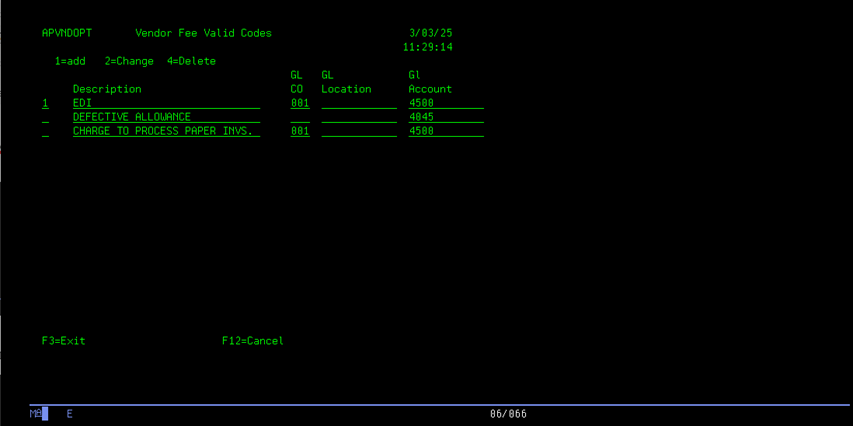
A description of the fee type is
required. A valid General Ledger account
number to charge is also required.
The default General Ledger company
and Cost Center to charge can also be entered, but are not required. If no Company or Cost Center are entered,
the Company and Cost Center that the invoice is charged will be used at invoice
creation time. Enter the new Fee
information and press ENTER to save.
To change the desciption or General
Ledger information for an existing Fee type, enter a ‘2’ in the option field on
the line for the fee type to change.
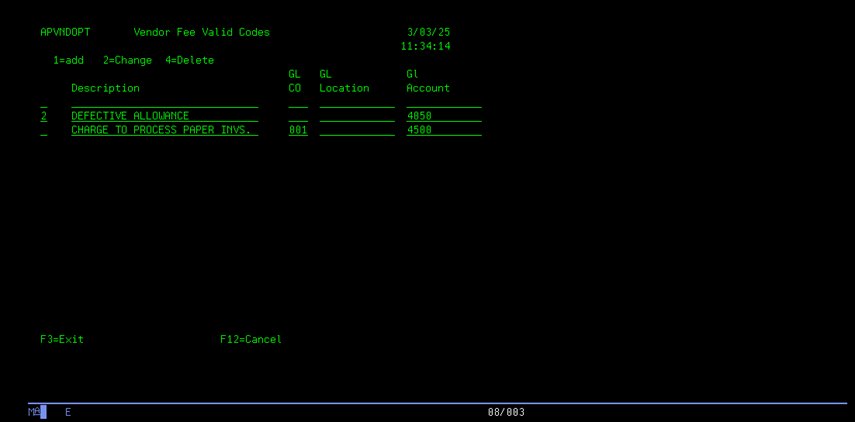
Any of the information on the line
can be changed, or added. Enter the
data to be changed and press ENTER to save the changes.
When all the required additions or
changes are made, press F3 to exit the maintenance program and return to the
menu.