Customer
Invoice Inquiry (ARR106/CTL1)
Can be accessed by:
1.
Menu 1950, “5” on particular invoice
2.
Menu
6640, F2, “pick invoice”, F5
3.
Menu
6640, F10, F8, “5” on a particular invoice
4.
Menu 6940, “pick
invoice”, F5
5.
Menu 6910
If
entering from any screen other than Menu 6910, you must use the mouse to click
on the particular invoice you wish to inquire or list INVOICE# in the
appropriate field, and then press (F5).
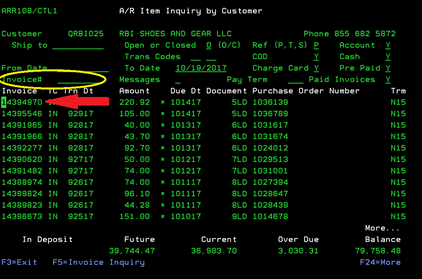
If
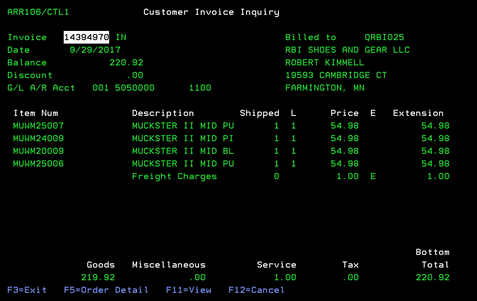
entering from Menu 6910, enter the invoice# to view the inquiry. This screen
gives details about the chosen invoice. From here you can: (F5)-Order Detail,
or (F11)-View. Pressing
(F11) will toggle the existing screen to show more details about the chosen
invoice.
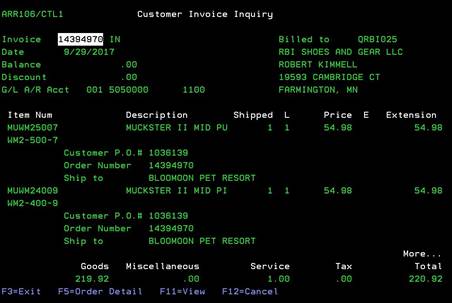
F11-view
This
option will expand your view to show the Customer PO#, order#, & ship to
name for each line on the order. This is a toggle option. Pressing F11 again
will change back to the previous screen.