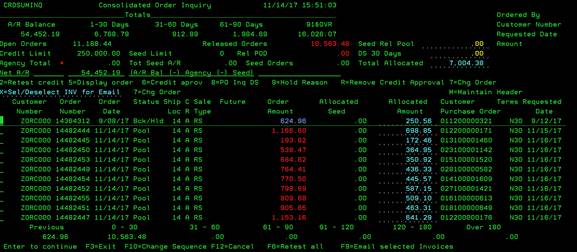
Consolidated Order Inquiry (CRDSUMINQ)
Can be accessed by:
1.
Menu 1115, “8” on customer# (VMI
Customers)
2.
Menu 1931
3.
Menu
6640, F10, F10
4.
Menu 6640. Total
Open order shortcut
5.
Menu 6640, Family
shortcut, F10
6.
Menu 6640,
Family shortcut, F11
7.
Menu 6645 (for salesmen)
8.
Menu 6646, “5” (for sales managers)
This
option displays the current open order listing for the selected customer. If
you enter this screen from any menu other than 6640, your menu options are
limited. If you enter this screen from 6640, you can choose: (2)Retest credit
-tests selected open orders for credit approval, (5)Display order Menu 1910,
(6)Credit approval CREDIT-NEW, (8)PO Inquiry DS Menu 4910,
(9)Hold Reason, (R)Remove credit approval CREDIT-NEW, (7)Change Order Menu
1110, (X)Select/deselect for email (see F9 option below), (M)Maintain
Header Menu 1112, (F10)Change sequence CHNGSEQ, (F6)Retest all -tests
all open orders for credit approval, (F9)Email selected invoices EINVSALE.