Accounts Payable EDI
Invoices overview
The Accounts Payable EDI program processes
vendor invoices with any vendors that are set up to send their invoices thru
EDI.
The EDI program will receive the EDI
data, convert it into the BWI AS400 database, and check the data for any
descrepancies.
Hard copy images of the invoice are
sent to the RVI imaging system, along with the associated purchase order.
If an invoice is received with
errors, a PDF copy of the invoice with the errors listed is sent to the
appropriate buyer and to the Accounts Payable clerk for that vendor.
Note: If
the only error found is because the product has not been received yet, the
invoice is flagged as an error, but no Email will be sent to the associated
buyer.
When the product is received, the
invoice is re-edited for errors. If any
new errors are identified (not Not Received errors) after the product is
received, then the Email will be sent to the buyer.
The AS400 converted data is saved in
invoice processing files.
If an invoice is received with no
errors, the invoice will automatically be added to the Accounts Payable system
for posting. Accounts Payable will be
notified by Email as invoices are added.
If the invoice is for a Direct Ship order, the program will bill the
customer and create the customer invoice and Accounts Receivable entries. If the Direct Ship customer receives a
hardcopy invoice via regular mail, the hardcopy will print at the corporate
office, who will then package the invoice for mailing.
When the invoice is posted, an
updated copy of the EDI invoice and the Purchase Order are sent to the RVI
imaging system (in case the invoice or Purchase Order was changed) and a copy
of the customer invoice if a Direct Ship order.
If an invoice is received, and the
only error is a variance between the vendor invoice costs and the Purchase
Order costs, the invoice will be sent to Accounts Payable to the buyer’s
variance screen (option 5120) to be corrected.
Note: this may require an option 8 to
push the invoice to Accounts Payable.
The program will then ask the user to verify that they want to send then
invoice with a variance.
The buyer can then correct the
variances in option 5120 like any other invoice. Once the variances are corrected, the
invoice will then transfer into today’s EDI invoice batch.
And an Email will be sent to the
associated buyer notifying them that the customer invoice has been processed.
Note: I.T.
will run the posting process automatically periodically during the day.
If an invoice is received with
errors, the invoice is held in the processing file for correction. Once the invoice (or purchase order is
corrected), the invoice will then automatically be added to Accounts Payable
and the Direct Ship customer order invoiced if required.
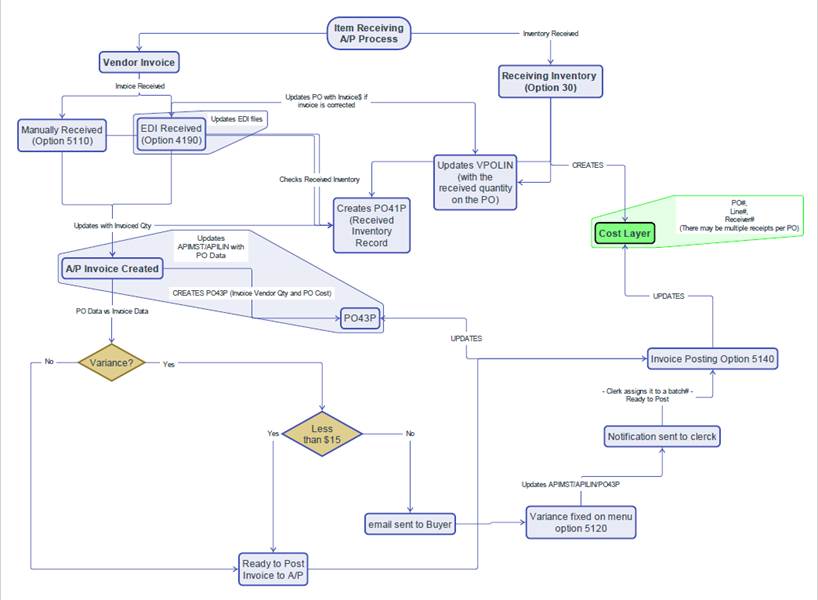
This flowchart will explain the flow
of the posting process and what files are effected.
Item number
determination:
Different vendors include the product item numbers
differently. Some include the BWI item
number, some include the vendor’s item number, some include the product’s UPC
number. Or any combination of the
three.
If the invoice contains the BWI item number, that is the item
number the program will list on the invoice.
If the BWI item number is not included, the program will try
to determine the BWI item number.
First, the program looks for the vendor’s item number in the
BWI vendor/item database. If no match is
found on vendor and vendor item number, the vendor item number is attempted to
match to other vendor codes within the vendor’s family group (such as OR, SI7,
and MT2 in the Scotts family group). If
the vendor item number is not found, the ‘=’ code file is searched for the
vendor item number. If the BWI item
number is still not found, the BWI database is searched by UPC number, if
received. If the BWI item number is
still not determined, an error is logged on the invoice detail line.
Item UOM conversion:
Sometimes vendors send invoices with item UOM’s different
than the UOM on the Purchase Order. Most
vendors invoice by the unit (UOM of ‘EA’).
Most Purchase Orders are entered by the stocking UOM.
If the invoiced UOM does not match the Purchase Order UOM,
the program will try to convert the Purchase Order quantities to the invoiced
UOM for auditing the invoice.
This conversion if for auditing the invoice only, the
Purchase Order UOM is NOT changed.
To convert the quantities, the item number is searched in the
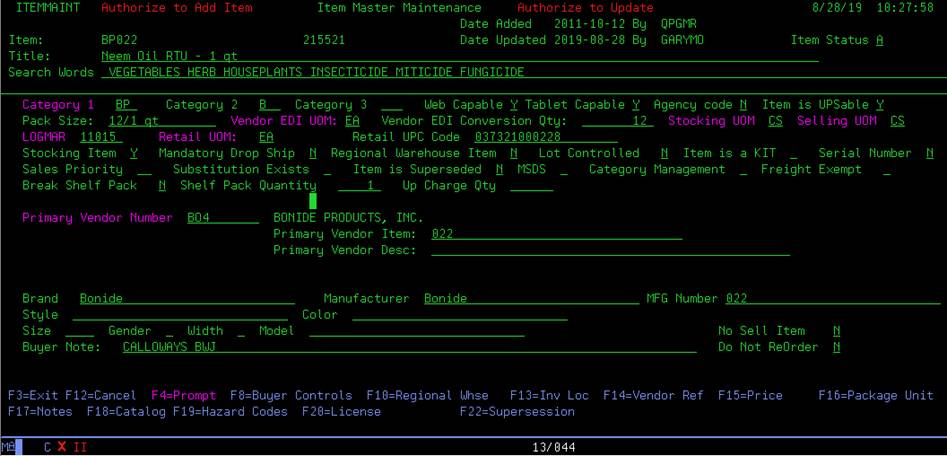
BWI item master for the conversion data.
The conversion UOM’s are checked for capability. If the Vendor EDI UOM (‘Customer UOM’)
matches the invoice UOM, and the stocking UOM matches the Purchase Order UOM,
the Purchase Order order quantity and received quantity is multiplied by the EDI
conversion quantity. The Purchase Order quantity will then be in the same UOM
as the EDI invoice.
If the invoiced UOM still does match the Vendor EDI UOM, the item UOM table (ITMUOM) is then checked
for pack quantities. Pack quantities are
determined for the Purchase Order UOM and the invoiced UOM. The Purchase Order quantity is multiplied by
the pack quantity for the Purchase Order UOM.
Then the Purchase Order quantity is divided by the pack quantity for the
invoiced UOM, if the invoiced UOM exists in the BWI UOM table. The Purchase Order quantity will then be in
the same UOM as the EDI invoice.
If invoiced UOM is not found in the BWI UOM table, such as OZ
or QT, the EDI conversion table (EDISLS) is then searched for the invoiced
UOM. If the invoiced UOM is found in the
EDI conversion table, the Purchase Order quantity is calculated by the
following.
The Lowest stocking UOM is determined for the item. Then the pack quantity is found in the UOM
table for the Lowest stocking UOM (usually 1).
Then the pack quantity is found for the Purchase Order UOM.
Then the Purchase Order quantity is multiplied by the pack
quantity for the Purchase Order UOM.
Then the Purchase Order quantity is divided by the pack
quantity for the Lowest stocking UOM.
Then the Purchase Order quantity is multiplied by the
conversion factor from the EDI conversion table.
The Purchase Order quantity will then be in the same UOM as
the EDI invoice.
For warehouse orders, the received quantity is compared to
the invoiced quantity, for Direct Ship orders, the order quantity is compared
to the invoiced quantity.
If the conversion information cannot be determined, or the
quantities do not match, an error is logged on the invoice detail line.



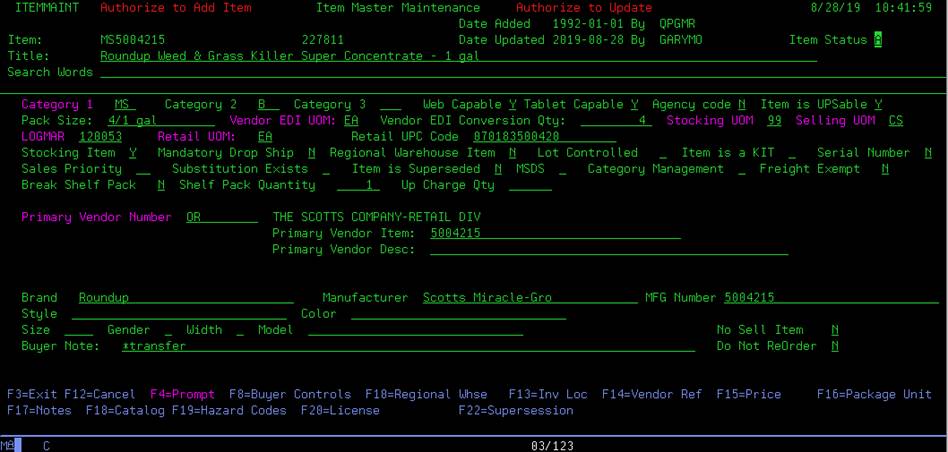
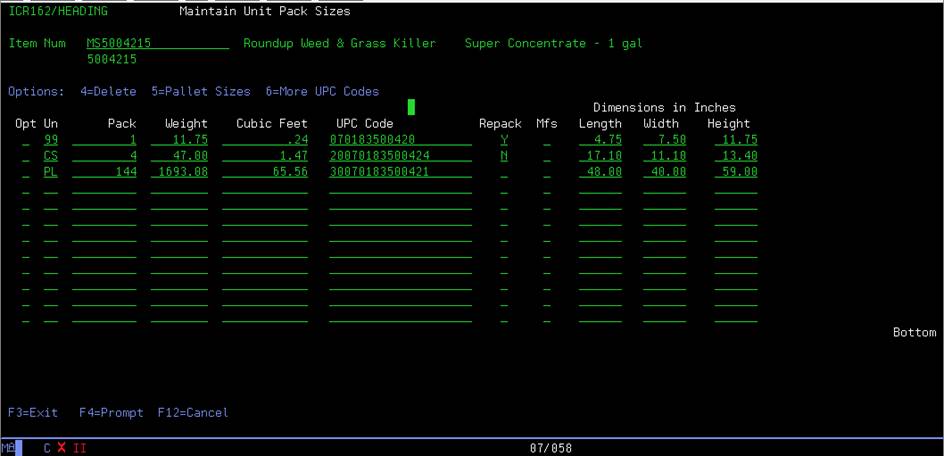
If the stocking UOM is coded as ‘99’, then the stocking UOM
is obtained from the item UOM master based on the item number and conversion
quantity.


Invoice Terms
determination:
Since our vendors do not know BWI’s vendor terms codes, the
program will try to determine BWI’s terms code based on the information
received on the EDI invoice.
Terms Type Code – The Terms Type
designates which date on the invoice that the terms are based on;
Type 1 – Terms
are based on the Ship Date
Type 2 – Terms
are based on the Delivery Date
Type 3 – Terms
are based on the Invoice date.
If no Terms Type is received, terms are based on the Invoice
date.
Net Due Date – If the date is not
received, but the Net Days Ddue is received, the Due Date will be determined by
the Terms Code Type Date added to the Net Days due.
Terms Discount Due Date – If the date is
not received, but the Net Days Due is received, the Discount Due Date will be
determined by the Terms Code Type Date added to the Discount Days due.
Net Days Due – If the Days Due is not
received, but the Net Due Date is received, the Net Due Days will be determined
by the Net Due Date minus the Terms Code Type date.
Terms Discount Days Due – If the Discount
Days Due is not received, but the Discount Due Date is received, the Terms Discount
Due Days will be determined by the Discount Due Date minus the Terms Code Type
date.
Terms Code – The vendor terms code is
determined in module TERMSEDI.
Once the Due Date(s) and/or Due Day(s) are determined, the
Accounts Payable Terms master is searched for terms matching the dates or days.
The terms master is searched for a matching Discount Percentage
and matching Discount Days Due and Net Days Due.
If a Days Due match is not found, the terms master is
searched for a matching Discount Percentage and matching Discount Due Date and
Net Due Date.
If the invoice does not have Discount Due information, the
Net Due information only is searched.
If multiple Terms Codes are found matching the received data,
and one of the Terms Codes matches the vendors standard Terms Code, that Terms
Code is used.
When a BWI Terms Code is determined, the Terms Description
received on the EDI invoice is replaced with the BWI Terms Description from the
terms master file.
If a BWI Terms Code can not be determined, the default Terms
Code of NET will be used, and the received Terms Description will be retained.
Invoice variance
Email:
During the invoice posting into Accounts Payable, if a
variance is determined, an Email will be sent to the buyer on the Purchase
Order notifying them of the variance.
This will be similar to the variance Email that are sent now
when a variance is created in the invoice entry program (option 5110).
Discrepancy
notification:
If a discrepancy report is created when the product is
received into inventory, a notification will be included in the Email to the
buyer when the invoice if first received and added to the processing
files.
Also, the Purchase Orders numbers will display in Red on the 4190 screen.
Additional user
invoice error notification:
If an invoice is received with errors, a PDF copy of the
invoice is automatically sent to the appropriate buyer with the errors listed.
If there are other users at branch locations that need to
receive the notification Emails, I.T. can set them up to receive the Emails
also. This can be useful if someone
besides the buyer on the Purchase Order is the person that checks the vendor
invoices or processes the Direct Ship customer invoices.
I.T. can add the additional users via the Email groups files
(EMAILGRPM/EMAILGRP). Add the user to
the Email group ‘EDI810EM’. Make sure to
enter the user’s branch in the EMAILGRP file, this tells the Emailing program
which invoices are to be sent to the requesting user.
EDI810DSP – view all
Active vendors:
In the 4190 screen, you have the option to view only the
invoices for vendors that are active into Accounts Payable processing. In the vendor search field (above the vendor
column), enter ‘ACTIVE’ as the vendor code. This will shorten the list to only invoices
for active vendors. The other search
criteria will still apply, the Active-only search can be combined with any
other search selection.
EDI810DSP – Retest
with Email option:
In the 4190 screen, the option 9 to Retest an invoice
does not resend the error notification via Email. Option 9 just checks to see if any errors
still exist for the invoice. The error
notification only sends the Email on the initial invoice receipt.
There is a hidden option, option Z, that will retest
the invoice AND resend the error notification to the associated buyer (if the
invoice has errors). This is useful if
the initial Email is lost or accidentally not sent.
User special
authority:
A few users will have authority that gives them access to
functions that most users do not have.
Authority code – EDI810.
These users can:
1) Access
all invoices, no matter what buyer or branch the invoice belongs to.
2) Change
information that is not available to most users:
a)
Purchase Order number.
Some users have
authority special authority, but less than users above.
Authority code – EDI810IN.
These users can:
1) Access
all invoices, no matter what buyer or branch the invoice belongs to.
2) No
changes or deletions are allowed.
Vendor definition
codes:
To automate as many of the decisions that need to be made
when posting invoices into Accounts Payable and billing the Direct Ship
invoices, I.T. has set up codes for each vendor to help determine how to handle
these decisions. These codes will be
stored in the BWI vendor master.
1)
EDI 810 invoice process (Y/N). This flag identifies the vendors that are
active in the automatic Accounts Payable invoicing process. I.T. will set the flag to ‘Y’ as we add
vendors
to the process.
2)
EDI 810 autocreate (Y/N) This flag identifies the vendors
that the program can automatically send invoice to Accounts Payable if no
errors are found.
An
‘N’ in this flag means the invoices will not automatically post, but require
the buyer to ‘Push’ (option 8) an invoice before
it will post to Accounts Payable.
3)
Change 810 invoice (Y/N) Some vendors do not allow changes to their
invoices, even when a receiving discrepancy is found. The full invoice must be paid, and a
credit
issued if necessary. A ‘N’ in this flag means this vendor does not
allow changes to their invoices
More information on this process is below.
4)
Direct Ship Shortage (B/C)
For vendors that do Direct Ship orders, these flags tell the program how to
handle any shipping exceptions.
The Direct Ship Shortage flag tells the
program what to do to the customer’s Sales Order when a order has an item that
was not fully shipped.
A “B” flag tells the program to Back-order the short item. A “C” flag tells the program to cancel the
short item.
Direct Ship Overage
(Y/N) The Direct Ship Overage
flag tells the program what to do when a order has an item that shipped more
product than was ordered.
A “Y” flag tells the program
to bill the customer for the additional quantity. A “N” only bills the customer for the
original order quantity.
Direct Ship Additional
(Y/N) The Direct Ship
Additional flag tells the program what
to do when a order has an item shipped that was not on the original order.
A “Y” flag tells the program to go ahead and bill the customer for the
additional items. A “N” does not bill
the customer for the additional items.
5)
Invoice limit to Charge Freight Invoice total amount that determines whether
to pass freight charge from vendor invoice on to customer for Direct Ship orders.
If total Sales Order amount is less than amount in VNDUDD field
DSFRTAMT, pass freight charge on to customer, else don't pass freight charge on to customer. If DSFRTAMT = 0,
pass freight charge on to customer.
Change was required for vendor AAC2, Alliance Animal Care.
Vendors that don’t
allow changes to invoices:
Some vendors do not allow changes to their invoices, even
when a receiving discrepancy is found.
The full invoice must be paid, and a credit issued if necessary.
These vendors are identified by the Change 810 Invoice
flag in the vendor master. A ‘N’ in this
flag means this vendor does not allow changes to their invoices.
If an invoice is received from a no-change vendor, the invoice quantity and invoice costs cannot
be changed in the invoice detail screen in option 4190.
When a warehouse invoice is received (or if a re-edit occurs)
and a difference between the received quantity and the invoiced quantity is
found, the error is noted.
The program waits a set number of days, currently 7 days,
then, if there is still a difference between quantities, an Email with a PDF
copy of the invoice is sent to the vendor’s Accounts payable clerk, and to the
buyer on the Purchase Order. This
waiting period is allowed in case the product is received in multiple shipments
at different times, and prevents sending the invoice to Accounts Payable
prematurely.
This Email tells the Accounts Payable clerk that there was a receiving
difference and this vendor does not allow invoice changes. The Accounts Payable clerk will take over the
invoice and enter manually as if it were a mailed invoice.
The EDI invoice is then automatically deleted from the 4190
processing screen.
Changes to Direct Ship
order number for Purchase Order:
When a Direct Ship sales order is created, the associated
Purchase Order is posted to the Sales Order detail records. When the associated Sales Order number is
needed for a particular Purchase Order, the Sales Order detail records are
searched for that Purchase Order number.
When a Back-order Sales Order is created for an invoiced
Direct Ship Sales Order, the same Purchase Order is posted to the Back-order
Sales Order.
This can cause a problem when trying to determine the Sales
Order for a requested Purchase Order; usually the original Sales Order is
retrieved. This is the situation when a
vendor invoice is received for the Back-order portion of a Direct Ship order;
the original Sales Order may be attached to the vendor invoice instead of the
Back-order Sales Order.
This also causes the invoice to issue an error stating that
the ‘Direct Ship Sales Order has already been invoiced’, since the invoice is
associated with the original Sales Order.
To correct this situation, the EDI invoice program will store
the Direct Ship Sales Order with the vendor EDI invoice data. In the 4190 invoice detail screen
(EDI810DTL),
the user has the ability to change the Sales Order for this
vendor invoice to the Back-order Sales Order.
This will allow the invoice to pass the edits, and the correct Sales
Order will be invoiced to the customer.
The new Sales Order number must be associated with this Purchase Order
to be accepted.
Vendor specific
programs:
Because no two vendors or customers operate exactly the same,
sometimes I.T. has to make exceptions to the normal processing to accommodate
these exceptions.
It is not good programming practice to hard-code programs
with exceptions for specific vendors or customers. To handle this process, I.T. has developed a
method to call vendor specific programs if the need arises. As each vendor’s invoice is processed, the
main program will look to see if a specific program exists for this vendor. If a program exists, it is called to handle
these unique exceptions. The vendor
specific programs are stored in file EDI810PGMS.
These are the vendors that currently have exception programs:
Scotts (SI7, MT2, OR)
- For Direct Ship orders, checks to insure the customer sales order has
a ZZOR7 (discount) line entered. This
is needed for tying the sales invoice to the
-
Accounts Payable invoice.
- For Direct Ship orders, checks to insure
invoice total balances to PO total (within variance).
WEYCO (WEY1) - For
Direct Ship orders, checks to make sure the customer sales order has a Freight
charge line added before the invoice can be processed and the customer is
-
invoiced.
-
- For Direct
Ship orders, checks each sales order line to insure the margin percentage is
less than the maximum allowed. This
insures that each sales order line
-
has a cost
entered correctly.
Bonide (BO4)
- For Direct Ship orders, checks to insure invoice total balances to PO
total (within variance).
HC Companies (AK1, DI3) - Checks for Items not on PO with cost that matches
discount on invoice header.
If
an item is a no-charge item (usually as part of another item on invoice), BWI
does not include on PO, but HC charges for the item, then enters a header level discount for the same amount to wash out. If
this situation is found, program will delete the no-charge item, and remove
discount from header.
Sometimes
items are invoiced with ZERO charge, if so, delete line from invoice.
DOW Agro (EL1, EL11, EL5) - Replace new Trading Partner ID
with old Trading Partner ID.
So partner will match with EDISLS file.
Oldcastle (HO2, COR, OC1, BR5, GL02) - Compares invoice total
to PO total.
Dewitt (DW)
- Sometimes items are invoiced with ZERO charge, if so, delete line from
invoice.
- When
generic item# 'CUSTOM_SEW' is received from Dewitt, match qty and cost to PO
detail to determine correct BWI item# to use on invoice.
- When Dewitt
invoice is received, check received UOM against UOM on PO line.
If PO
quantity and cost matches Invoice quantity and cost, change invoice UOM to match
PO UOM.
Various Vendors
- For warehouse invoices only. Call program EDI810PUSH.
Read all error codes, and check to see if
errors are allowed. If no un-allowed
errors, set invoice to PUSH status.
Done
to allow invoices with variances over variance tolerance to push to Accounts
Payable. In Accounts Payable, invoice
is set to pending status (no batch
assigned) and buyer is notified to correct variances.
List of vendors affected in file
EDI810PGMS.
- For Direct Ship
invoices only. Call program EDI810FRTA.
Checks to insure the customer sales order
does not have a Freight charge line, if the vendor invoice has a Freight charge
line. This is
because the Freight charge on the vendor
invoice is passed thru to the customer’s invoice. This is to prevent the
customer from being double billed for
freight.
List of vendors affected in file EDI810PGMS.
- Call
program EDI810DISC.
Checks to insure the vendor invoice has a
discount amount included.
Needed because some PO’s
are entered at full cost on each line, and invoiced at full cost on each
line. If the discount amount is not
included on the vendor invoice,
the invoice costs will match the PO costs and the invoice will post at full
costs. If the vendor invoice has a discount
included, the invoice will cause a variance, allowing the buyer to correct the
PO costs before posting A/P invoice.
Request was required for
vendor SD2B, Central Life Sciences.
List
of vendors affected in file EDI810PGMS.