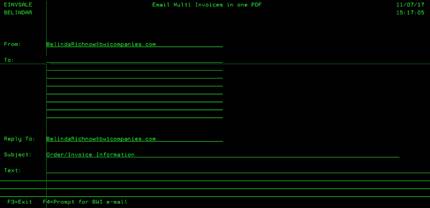
Email Multi Invoices in one
PDF (EINVSALE)
Any
invoices marked with an “Y” in the email column of Menu 6640 will be sent by
email from this screen. You can select multiple emails for delivery of these
invoices. Once you enter all the emails for delivery (one email on each line),
press ENTER. You will see a last screen showing that the email was sent. The
selected invoices will be sent in one PDF file to the addresses
specified. Press ENTER to return to the previous screen.