Item
Information Maintenance (ICR101)
Can be accessed by:
1.
Menu 1910, ‘H’ on a particular line item,
F10, F9
2.
Menu
1930, 5 on a particular invoice, ‘H’ on a particular
line item, F10, F9
3.
Menu 3110, F9
4.
Menu 3910, F9
5.
Menu 3924, option 7,
F9
6.
Menu 3924, option 6
7.
Menu 3924, F9,
option 6
8.
Menu 3924, F9,
option 8, option 6
9.
Menu 3924, option 5,
F6, option 5, option H, F10, F9
10.
Menu 3930, F9
11.
Menu 6640, Enter,
F2, F5, F5, ‘H’ on a particular line item, F10, F9
This
option takes you to the Notes section of Item Maintenance. The top portion is
what we show on our website and catalogs. The lower portion is information that
the divisions have added and are seen in-house (or possibly on invoices). You
can press PAGE DOWN (after clicking in the top or botton section) to see more,
if available. This screen is for display only. From this screen, you can select
(F9)Catalog Maintenance or return to the previous screen. If you need to make
changes to the Long Description or Notes, you must enter this screen from Item
Maintenance Menu
3110.
Only selected people have this priviledge and responsibility. See your
supervisor for more information
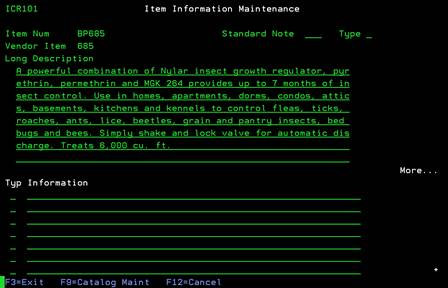
If
adding information to the bottom portion of this screen, it is important to
list a “TYP” category. The valid codes for the TYPE field are:
·
“A”-Hazmat item information
·
“E”-EPA number
·
“P”-Prints on customer invoice
·
“*”-only visible in Item Information Maintenance
·
“blank”-message will appear when ordering this item.