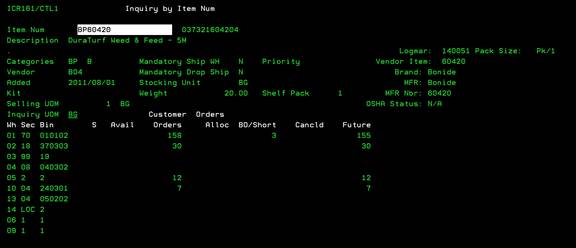
Inquiry Inventory by Item Num (ICR161/CTL2)
Can be accessed by:
1.
Menu 3910
2.
Menu 3924, option 5
3.
Menu 3924, F9, option 5
4.
Menu 3924, F9, option 8, option 5
This option will display
available warehouses/bins and quantity available. From this screen, you can
press different function keys to view data concerning this particular
item. You can press: (F2)-History Menu
3990, (F6)-Sales/Orders Menu 1940, (F4)-Prompt Menu 3924, (F9)-Notes
ICR101, (F11)-View, (F16)-Regional Warehouse MANWHSE01D/CTL1,
(F13)-More UOM, (F22)-Switch Quantites and (F20)-License
Information ICR135.
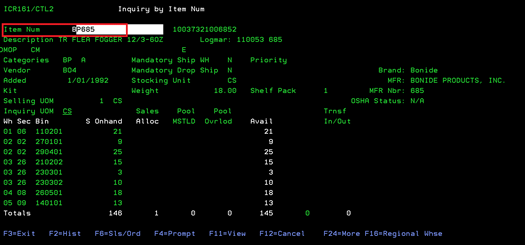
View- F11
Can be accessed by:
1.
Menu 3910, F11
2.
Menu 3924, option 5, F11
3.
Menu 3924, F9, option 5, F11
4.
Menu 3924, F9, option 8, option 5, F11
This is a toggle to display more details about the quantities available. Press F11 again to return to previous view.
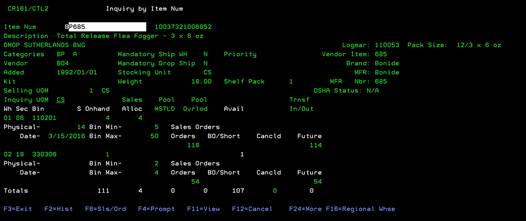
View- F22
Can be accessed by:
1.
Menu 3910, F22
2.
Menu 3924, option 5, F22
3.
Menu 3924, F9, option 5, F22
4.
Menu 3924, F9, option 8, option 5, F22
This is a toggle to display more details about available quantities, allocated quantities and future quantities. Press F22 again to return to previous view.