Purchase Orders for
an Item Num (ICR165/HEADING1)
Can be accessed by:
1.
Menu
1910, ‘H’ on a particular line item, F10, F5
2.
Menu
1930, 5 on a particular invoice, ‘H’ on a particular
line item, F10, F5
3.
Menu
3924, option 7, F5
4.
Menu 3924,
option 5, F6, option 5, option H, F10, F5
5.
Menu
3930, F5
6.
Menu 4920
7.
Menu
6640, Enter, F2, F5, F5, ‘H’ on a particular line
item, F10, F5
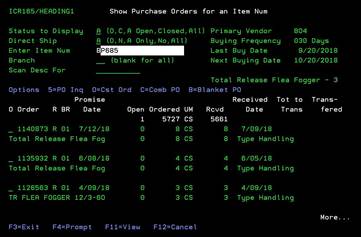
This
option shows all purchase orders for this particular item, if applicable. You
can display this list by Order Status and Branch. From here you can select: 5-PO
inquiry, O-Customer order, C-Combination Purchase Order, B-Blanket Purchase
Order-toggles for more details, F4-Prompt in Item# or Branch#, and F11-View toggles for
more order details.
F11 -View Purchase orders for an item num
Can be accessed by:
1.
Menu
4920, F11
2.
Menu
3924, option 5, F6, option 5, option H, F10, F5, F11
3.
Menu
6640, Enter, F2, F5, F5, ‘H’ on a particular line
item, F10, F5, F11
4.
Menu
1910, ‘H’ on a particular line item, F10, F5, F11
5.
Menu
1930, 5 on a particular invoice, ‘H’ on a particular
line item, F10, F5, F11
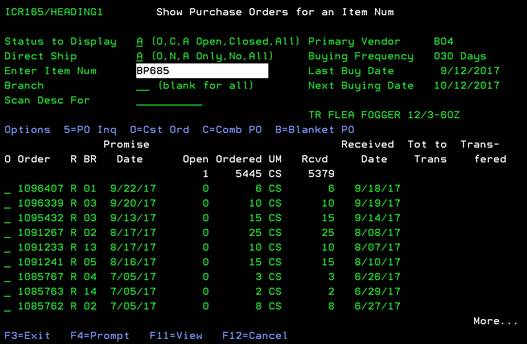
This
option will display longer item description and quantities. This is an
inquiry-only screen. Press ENTER to return to previous display.