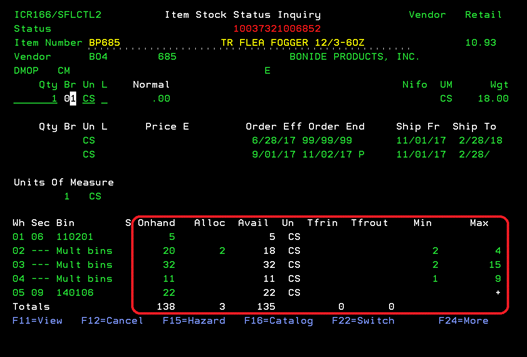
Item Stock Status (ICR166/SFLCTL2)
Can be accessed by:
1.
Menu
1910, option H, F10
2.
Menu 3924,
option 7
3.
Menu
3924, F9, option 7
4.
Menu
3924, F9. option 8, option 7
5.
Menu
3924, option 5, F6, option 5, option H, F10
6.
Menu 3930
7.
Menu 3940, 5
8.
Menu
6640, Enter, F2, F5, F5, ‘H’ on a particular line
item, F10
The
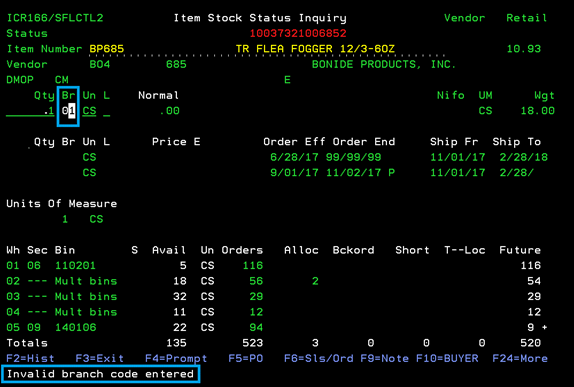
Stock Status Inquiry screen will show quantities available for a particular
item number. You may receive an “Invalid Branch code Entered” message if you
did not enter a Branch# on the initial screen. You can enter the Branch # in
the BR section to see available quantities for that location. From this screen,
you can choose: (F2)History Menu 1960;
(F4)Prompt SLCUSTOMER;
F5)PO Menu 4920, (F6)Sales/Order Menu 1940, (F9)Note ICR101,
(F10)BUYER,
(F11)View -toggle for on
screen display, (F15)Hazard ICR125, (F16)Catalog Menu 3120, and (F22)Switch -toggle for on
screen display.
(F11) View
Can be accessed by:
1.
Menu 1910,
option H, F10, F11
2.
Menu 3924,
option 7, F11
3.
Menu
3924, F9, option 7, F11
4.
Menu
3924, F9. option 8, option 7, F11
5.
Menu
3924, option 5, F6, option 5, option H, F10, F11
6.
Menu 3930,
F11
7.
Menu 3940, 5, F11
8.
Menu
6640, Enter, F2, F5, F5, ‘H’ on a particular line
item, F10, F11
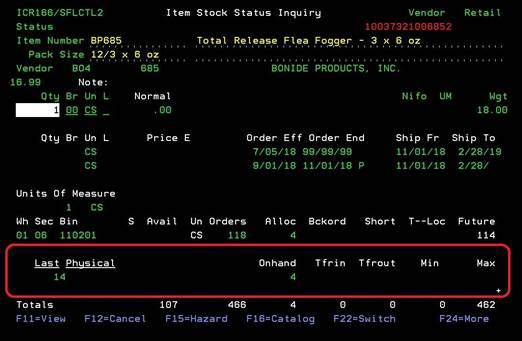
This screen is a toggle
display that shows additional quantity fields for this item. Pressing F11 again
will return to the previous display.
(F22) Switch
Can be accessed by:
1.
Menu
1910, option H, F10, F22
2.
Menu 3924,
option 7, F22
3.
Menu
3924, F9, option 7, F22
4.
Menu
3924, F9. option 8, option 7, F22
5.
Menu
3924, option 5, F6, option 5, option H, F10, F22
6.
Menu 3930,
F22
7.
Menu 3940, 5, F22
8.
Menu
6640, Enter, F2, F5, F5, ‘H’ on a particular line
item, F10, F22
This
screen is toggle display that shows the total On Hand quantities, allocated
quantities and Min/Max for this item. Pressing F22 again will return to the
previous display.