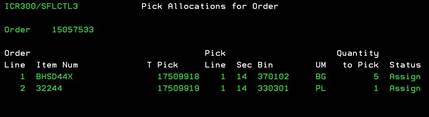
PICK Allocations
for Order (ICR300/SFLCTL3)
Can be accessed by:
1.
Menu 1506,
Motor Frt, Our Truck, etc…,
A
On this screen, the item allocations are listed for the selected order. From this screen you can press F11 to view the item description and quantities picked or press F12 or F3 to exit this screen.
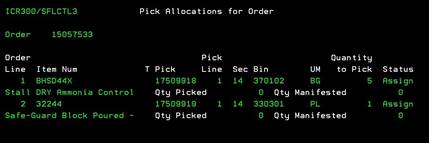
F11 Extended View PICK
Allocations
Can be accessed by:
1.
Menu 1506,
Motor Frt, Our Truck, etc…,
A, F11
This is a toggle from the Pick Allocations screen. This shows the item descriptions and any quantities picked. Press F11 to switch back to the previous screen or press F12 or F3 to exit this screen.