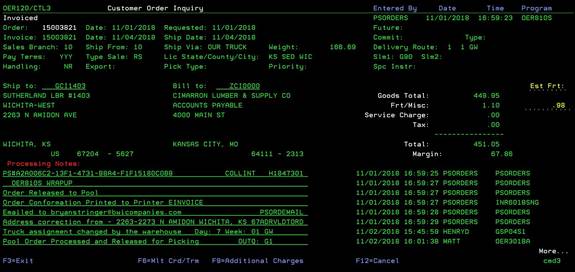
Customer
Order Inquiry -second screen (OER120/CTL3)
Can be accessed by:
1.
Menu
1910, ENTER
2.
See above
for completed list
Pressing
ENTER from screen one, brings you to to the second screen of the Customer Order
Inquiry. This screen will list delivery information, Ship Via, requested date, goods
total/freight charges, and all system notes for processes and changes made to
this order. You can press PAGE DOWN to
scroll through the notes section. From
here you can choose: F6-Mtl Crd/Term OER120/CTL5, F9-Additional Charges OER312/CTL1
or F12-takes you back to Screen 1, OER120/CTL2.