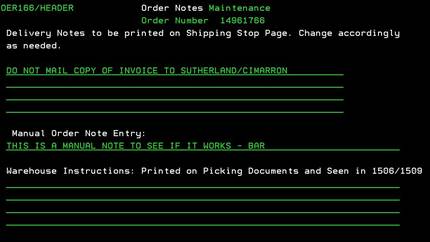
Order
Notes (OER166/HEADER)
Can be accessed by:
1.
Menu 1112,
F7
2.
Menu 6640, F10, F10, “M” on a particular
invoice, F7
This
screen is for entering notes for this order. These will appear in numerous
places according to which area the note is placed. Press ENTER once your notes
are completed to save and exit. Notes can be viewed in this option or by using Menu 1910.