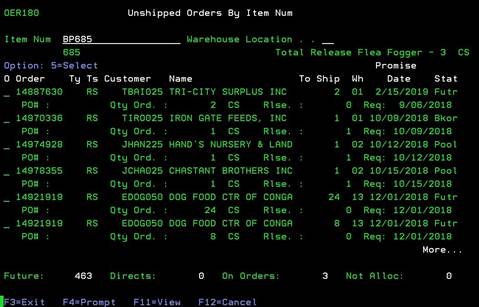
Unshipped Orders by Item Num (OER180)
Can be accessed by:
1.
Menu
1910, ‘H’ on a particular line item, F10, F6
2.
Menu
1930, 5 on a particular invoice, ‘H’ on a particular
line item, F10, F6
3.
Menu 1940
4.
Menu 3910, F6
5.
Menu 3924, option 7, F6
6.
Menu 3924, option 5, F6
7.
Menu 3930, F6
8.
Menu
6640, Enter, F2, F5, F5, ‘H’ on a particular line item, F10, F6
This
screen will show you the number of orders that are “Unshipped Orders”, whether
they are in pool or in backorder status. This view is filtered by your current
Warehouse location. From this screen you
can choose: F11-view
to toggle for more details; or “5”-select to access Customer Order Inquiry Menu
1910 for that particular order.
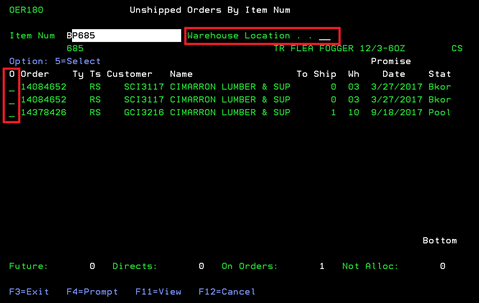
F11 – view
Can be accessed by:
1.
Menu
1910, ‘H’ on a particular line item, F10, F6, F11
2.
Menu
1930, 5 on a particular invoice, ‘H’ on a particular
line item, F10, F6, F11
3.
Menu 1940, F11
4.
Menu 3910, F6,
F11
5.
Menu 3924, option 7, F6, F11
6.
Menu 3924, option 5, F6, F11
7.
Menu 3930, F6,
F11
8.
Menu
6640, Enter, F2, F5, F5, ‘H’ on a particular line
item, F10, F6, F11
This
toggle options shows extra details about the orders listed on the current
screen. You can press F11 again to return to the previous view.