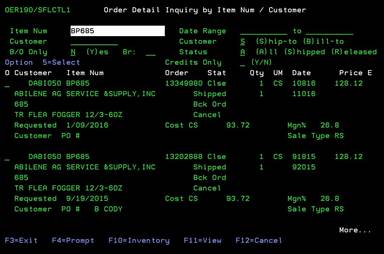
Order detail
inquiry by item num/customer (OER190/SFLCTL1)
Can be accessed by:
1.
Menu 1910, option H
2.
Menu 1960
3.
Menu 3924, Option 7, F2
4.
Menu 3924, option 5, F6, option 5, option H
5.
Menu 3930, F2
6.
Menu
6640, Enter, F2, F5, F5, ‘H’ on a particular line item
This
option will show you the order detail inquiry. You can see every customer that
purchased a specific item or you can leave the Item Num field blank and see all
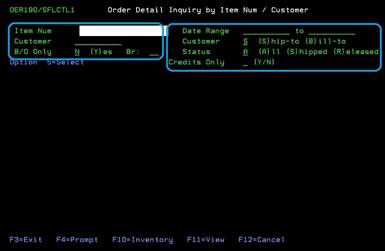
order detail for a specific Bill-To customer. You can filter this view by date
range, B/O, status, Branch# and Credits Only (shown in blue).
From
here you can choose: (5)-Select-brings selected order to Customer Order Inquiry Menu 1910, (F4)-prompt on Item Num Menu 3920 or Customer# SLCUSTOMER, (F10)-Inventory Menu
3930 and (F11)-view.
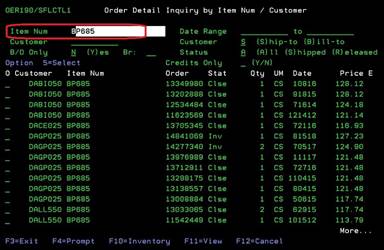
Sort
by item:
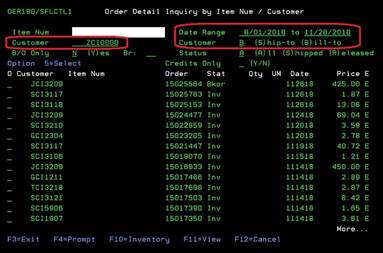
Sort
by Customer Bill-To:
F11-View
Can be accessed by:
1.
Menu 1910, option H, F11
2.
Menu 1960, F11
3.
Menu 3924, Option 7, F2, F11
4.
Menu 3924, option 5, F6, option 5, option H, F11
5.
Menu 3930, F2, F11
6.
Menu
6640, Enter, F2, F5, F5, ‘H’ on a particular line item, F11
Pressing
the F11 will toggle the display to show specific details about each order on
screen. Pressing F11 again will return to the previous view.