WMS PICK assignments by Ship Via (OER303Z/CTL1)
Can be accessed by:
1.
Menu 1506,
Motor Frt, Our Truck, UPS, etc…,
ENTER
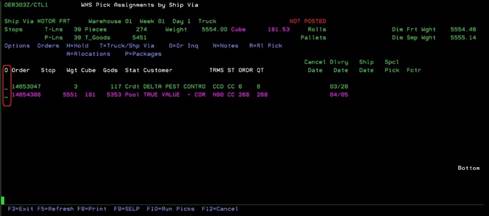
On this screen, the orders for the designated Branch and Ship Via are shown as chosen by the previous screen. This screen has a lot of data about the requested orders. You can view weight, cube size, stops, pieces, order status, customer# terms, and order dates. There are many options available here. For each order line, you can choose: (H) Hold, (T) Truck/Ship Via, (O) Order inquiry (See Menu 1910), (N) Notes (See OER166/HEADER), (R) release to picking, (A) allocations of stock listing (ICR300/SFLCTL3) and (P) packages (See OER325). Find the order you wish to Release to Picking status and type ‘R’ in the Option field and press ENTER and then F10 to release the order. This action places the order in SELP “selected for picking” status. There are several function keys also available on this screen: (F5) Refresh screen (clears the ones already released to picking), (F8) Print, (F9) SELP (shows orders in PICKING status), (F10) Run picks (returns to previous screen to see PICKS only) or (F12) or (F3) to exit this screen.
*Special Motor
Freight Instructions: Release only ONE
(1) MOTOR FRT order at a time unless they are multiple orders going to the SAME
customer ship-to address.
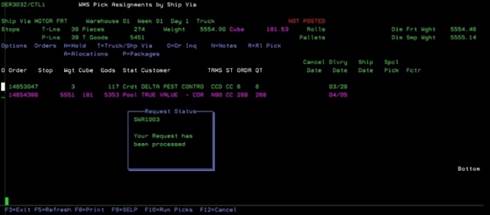
You should get a pop-up screen to show that the order was processed for Picking. The pick ticket and labels will print for the warehouse to pull. Deliver your paperwork to warehouse for picking.
**Special Motor Freight Instructions: If you processed your shipment via Motor Freight Carrier website (without preprinted Book/sheet of labels), your “labels” may be printed on regular paper and require taping to the pallets/shipment. On the pick ticket, staple or paperclip the Pro Bill label sheet that has already been entered into the system using Menu 56163. Do not peel and stick any of the individual Pro Bill stickers to this paperwork. You will be given instructions on where the stickers need to be placed. It is imperative that the Pro Bill number be entered in Menu 56163 BEFORE Warehouse begins picking this order. Deliver your paperwork to Warehouse for picking.