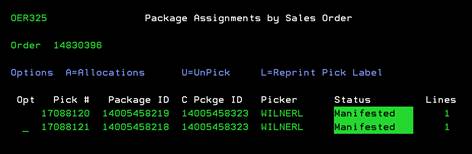
Package Assignments by Sales Order (OER325)
Can be accessed by:
1.
Menu 27,
F4, 5, ENTER, P
2.
Menu 27,
Shipment#, ENTER, P
3.
Menu 28,
Shipment#, ENTER, P
This screen displays the Pick#, Package ID, Consolidated Package ID, Picker name, Status and Line count for shipments in the system. The “Status” field which is updated LIVE as the picking/scanning process is done in the warehouse. Available status codes are:
· Assign-the order is available for order filling
· Rdy Ship-the ordered items have been picked
· Manifested-the order has been consolidated (Menu 21)
· Onboard-the order has been scanned on board and closed
From here you can choose: (A)-allocations, (U)-Unpick -immediately removes the picked quantity amount and places items back into available stock; or (L)-reprint pick label. These options should only be used by Warehouse Dept for picking the order.