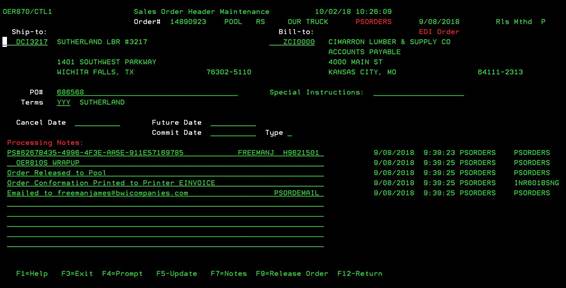
Sales Order
Maintenance (OER870/CTL1)
Can be accessed by:
1.
Menu 1112
2.
Menu 6640, F10, F10, “M” on a particular
invoice
This
screen is for simple changes to an order’s “header information” (not specific
line items). If you want to release a single order to Pool, you can also use
this option. This option will not work on an order that has already been
invoiced. If you need to make changes to the “line items” of an order, you must
use Menu 1110.
Enter
the desired order# that needs to be changed (or released) and press ENTER. This
screen will display the Order Header information and processing notes. From
this screen you can change the Ship-To & Bill-To customer, PO#, Cancel date, future date, commit date and commit
type. When entering dates, enter MMDDYYYY format without dashes or slashes. All
changes made on this screen will create a NOTE in the order processing notes to
show what changes were made.
The
Commit Type is used to commit/allocate the inventory to this order. Use this field in conjunction with the Future
Date and Commit Date fields. Commit Type
has two options: “C” – Commit date based on future date or “M” – Commit date
manually entered. Cancel, Future or Commit Dates cannot be earlier that the current
date.
Once
you make the changes necessary, you can choose: (F4)-prompt on Ship-to and Bill-to
fields SLCUSTOMER;
(F5)–update changes; (F7)-notes OER166/HEADER; (F9)-release
order to Pool OER115/SCREEN1.