Purchase Order Notes
Can be accessed by:
1.
Menu 4110, F7
If there are special order quoting/pricing or shipping information that needs to be sent with this particular order ONLY, it should be added to the PO Notes section (F7) and not as a blank item “follow-line”. In this way, it can be transferred to the EDI Purchase Order for transmittal. “Follow Lines” do not go via EDI.
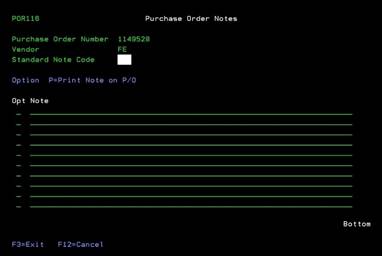
Enter the Purchase Order specific notes on the screen below. Be sure to use “P” in the option field so these will print out on the Purchase Order. Put your most important information on the FIRST line of messages. Some vendors are only capturing the FIRST line of message notes. You can enter special pricing/quote info, delivery times, etc. on these “P” notes. Please avoid using “*” as they do not translate to EDI orders. Press ENTER when done.
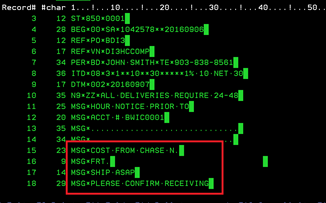
The Purchase Order Notes (F7) are shown below on EDI version of the Purchase Order after any Vendor Notes. Please let your Vendor know that the MSG (Message) section is where all special shipping/quote# will be placed on EDI orders.