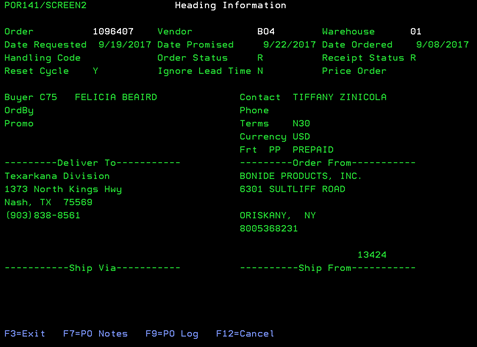
Purchase order inquiry (POR141/SCREEN2)
Can be accessed by:
1.
Menu 1910, ‘H’ on a particular line item, F10, F5, ‘5’
2.
Menu 1930, option 5,
‘H’ on a particular line item, F10, F5, ‘5’
3.
Menu 3924, option 5,
F6, option 5, option H, F10, F5, option 5
4.
Menu 4910
5.
Menu 4920, option 5
6.
Menu 6640, Enter,
F2, F5, F5, ‘H’ on a particular line item, F10, F5,
‘5’
This
option will display the purchase order inquiry screen, page 1- basic
information screen. This screen will show the Ship-to and Order-by information
for this particular Purchase Order. Pressing ENTER will take you to page 2
screen- line detail which shows the details of this order. From the first
screen you can choose: (F7) PO Notes and (F9)PO Log.