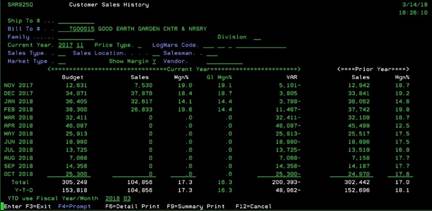
Customer
Sales History (SAR925Q)
Can be accessed by:
1.
Menu
57830
2.
Menu 6640, $SalesYTD
Shortcut
This screen shows a particular customer’s sales
history. You can use F4-prompt to search on fields: Ship-to, Bill-to, Family,
Division, LOGMAR, Sales Type, Sales
Location, Salesman, Market Type and Vendor.
This sales history report
can be specially tailored by the fields you choose. The more fields completed,
the more unique and filtered this report becomes. This report can be printed as well. You can choose: F6-print
detail report, F9-print summary report. If you do not wish to print, press
(F12) or (F3) to exit