AS400 - 57920
Customer Program Savings
Option 57920
The page that comes up will look like this:
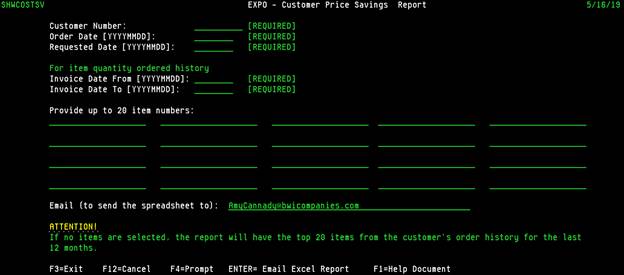
In the first blank on the page, you’ll need to put your customer’s SHIP-TO account code and it must be right justified just like all other customer account code fields in the AS400.
The Order and Request Dates – these fields are REQUIRED
Order Date – the date your customer plans to place their order. Format must be 20190101 (1/1/2019)
Request Date – the date your customer requests delivery. Format must be 20190215 (2/15/2019)
Invoice Date From & To – This is the time frame that the history quantity will be calculated from as well as the TOP 20 if you choose not to select specific items below.
The Item Numbers – You can supply up to 20 different item codes.
· If you do not know the BWI Item code, you can do an F4 on the item code blanks and it will take you to a search page (3924) to select the item you’re looking for.
· You can also choose to leave this area completely blank. When left blank, the report will generate the TOP 20 items (based on quantity) for the SHIP-TO customer you have selected.
EMAIL – This field is populated with YOUR EMAIL ADDRESS. The system will allow you to overwrite that with another valid email address. It is recommend you let the system send the report to you so that you can review and/or manipulate before sending on to a customer.
Once you’ve made your selections, click ENTER.
Usually within 60 seconds, you will receive an email in your INBOX from CREDIT@BWICOMPANIES.COM or BWTAR@BWICOMPANIES.COM or BWJAR@BWICOMPANIES.COM, or any similar email depending on your branch. This is not a valid or manned email address; no one will answer if you REPLY.
Your report will be attached to the email and will look very similar to this:
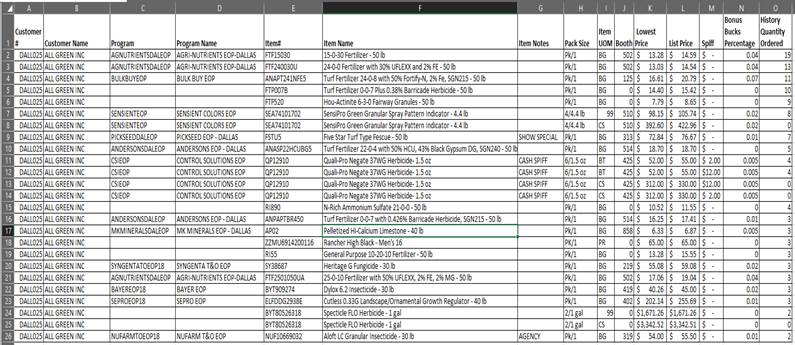
If your report does not contain something in Column C – then the item is NOT on a promotion for the time frame you selected.
If you see item ‘ZZ’ in column E – I’d delete that. This indicates the item does not exist any longer.
Notice Column G indicates if there are FREE GOODS and/or if the item is in Pallet Alley, etc.
Column M indicates if there is a SPIFF on the program with the Lowest Price.
Column N is the percentage of bonus bucks that will be paid to the customer upon checkout based on the selling price and quantity he/she purchases.