SAMPLE FORMULAS
 In
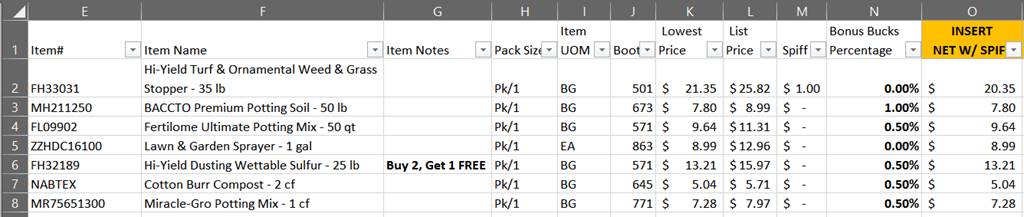
the example, LOWEST PRICE is the promotional price for the customer.
In
the example, LOWEST PRICE is the promotional price for the customer.
First, I’ve inserted a new column (in yellow) and labeled it NET W/ SPIFF.
 To
get the NET PRICE with the SPIFF I took the Lowest Selling price and subtracted
the SPIFF from it. Then I ran the formula down the entire column. Those that
have a SPIFF will calculate and those that don’t, you’re just deducting ZERO,
so the lowest price remains the same.
To
get the NET PRICE with the SPIFF I took the Lowest Selling price and subtracted
the SPIFF from it. Then I ran the formula down the entire column. Those that
have a SPIFF will calculate and those that don’t, you’re just deducting ZERO,
so the lowest price remains the same.
 Now,
I’m going to calculate the NET price to include the Bonus Bucks.
I have inserted another column indicating NET W/ BB.
Now,
I’m going to calculate the NET price to include the Bonus Bucks.
I have inserted another column indicating NET W/ BB.
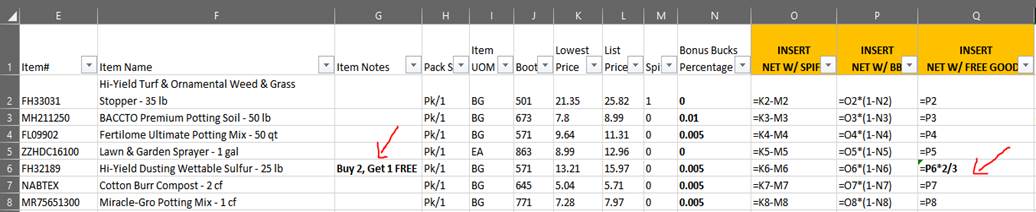
 To
calculate the Net with the Bonus Bucks, I’m going to take my NET price in
column O and multiply it by the reciprocal of the Bonus Buck percentage in
column N. Then I run the formula down
the entire list so that each line will calculate based on what’s in the Bonus
Buck Percentage column. The formula will look like this:
To
calculate the Net with the Bonus Bucks, I’m going to take my NET price in
column O and multiply it by the reciprocal of the Bonus Buck percentage in
column N. Then I run the formula down
the entire list so that each line will calculate based on what’s in the Bonus
Buck Percentage column. The formula will look like this:
 Next,
I’m going to insert another new column to calculate my NET price so that it
includes any FREE GOODS, that are indicated in column G. To do this
calculation, I’m going to start with our Net price in column P. I’m going to
multiply that by how many the customer has to PAY FOR
(order). Then divide that by how many they will actually
receive (the FREE GOODS).
Next,
I’m going to insert another new column to calculate my NET price so that it
includes any FREE GOODS, that are indicated in column G. To do this
calculation, I’m going to start with our Net price in column P. I’m going to
multiply that by how many the customer has to PAY FOR
(order). Then divide that by how many they will actually
receive (the FREE GOODS).
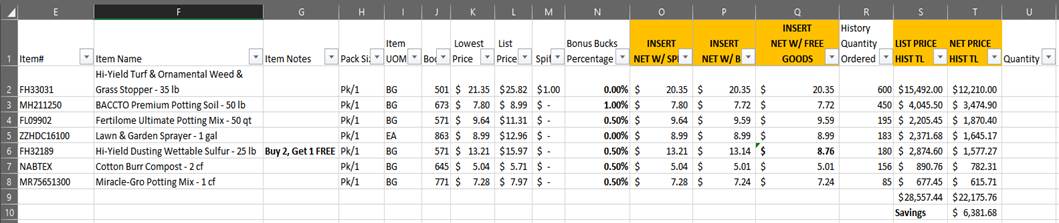
Now that you have your NET PRICE that includes Bonus Bucks, SPIFF’s and FREE GOODS, you can calculate their SAVINGS based on HISTORY.
 Here,
I have inserted 2 more columns and labeled them LIST PRICE HST TL (Totals base
on History and LIST PRICE) and NET PRICE HIST TL (Net Price based on History
Totals).
Here,
I have inserted 2 more columns and labeled them LIST PRICE HST TL (Totals base
on History and LIST PRICE) and NET PRICE HIST TL (Net Price based on History
Totals).
For the LIST PRICE totals, I took the number in the LIST PRICE column (column L) and multiplied it by the number in the HISTORY column (R) and put it in new column S.
Then I took the NET PRICE (column Q) and multiplied it by the HISTORY column (R) and put it in new column T.
Then I totaled column S and I totaled column T. Where I have the SAVINGS formula, I deducted the total for column T from total of column S.
This is what our spreadsheet looks like now that you can share with the customer. This shows, by coming to the EXPO and buying their history on these 7 skus, they’d save over $6,000 versus LIST PRICE. You can share this with your customer and there is a column at the end for them to populate how many they really want. You can use this information to pre-book for them on the website or they can take this to the BOOTH at the EXPO (booth # is in column J) and place their order there.