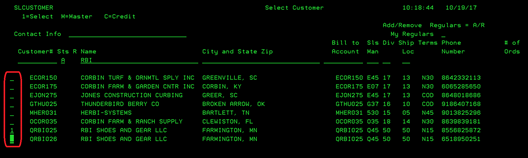
Customer
Prompt (SLCUSTOMER)
Can be accessed by:
1.
Customer#
field, F4 customer# lookup
2.
Menu
1710. F4 customer# lookup
3.
Menu
1712. F4 customer# lookup
4.
Menu
1715, F4 customer# lookup
5.
Menu
1931, F4 customer# lookup
6.
Menu
1932, F4 customer# lookup
7.
Menu 3924,
F9, F4 customer# lookup
8. Menu 3930, F4 customer# lookup
9.
Menu
6920, F4 customer# lookup
10.
Menu
6213, F4 customer# lookup
11.
Menu
6211, F4 customer# lookup
12.
Menu
6210, F4 customer# lookup
13. Menu 6640, F4 customer#
lookup
On
this screen, you can search by customer number, customer name, city/state/ZIP,
Bill to account, Sls Man, division or Ship Loc. Enter your search criteria and
press ENTER.

Once
you have a listing of available customers, you can enter your action choice in
the far left “option” field. You can choose: (1) Select -transfers customer# to
previous screen, (M) Customer Master Inquiry screen or (C) Credit Inquiry, if
entering this from a menu option other than 6640.