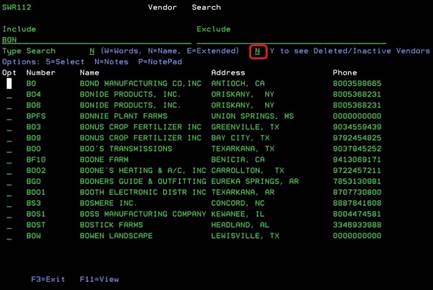
Vendor Search (SWR112)
Can be accessed by:
1.
Menu 3940, F4
2.
Menu 5170, F4 on
Vendor#
3. Menu 5920, F4 on Vendor#
This
option will allow you to search for a Vendor# by name. You can enter the full
name or a partial name to see the vendor listing. The initial vendor list
excludes deleted or inactive vendors. If you wish to see those, enter a “Y” in
the proper field. From here you can choose: 5-select (brings selection to
previous screen); N-notes, and P-notepad.