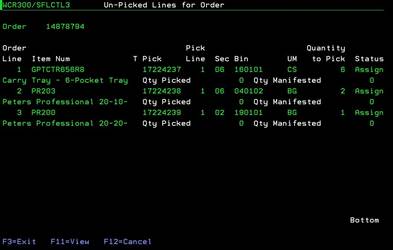
Unpicked Line for Order (WCR300/SFLCTL3)
Can be accessed by:
1.
Menu 27,
F4, 5, ENTER, L
2. Menu 27, Shipment#, ENTER, L
Placing an “L” beside an order will bring you to the
Unpicked Lines for Order screen. This is a display only screen to show the
items and quantities left to pick on this particular order.
You can choose: F11-View or F3/F12 to exit this screen.
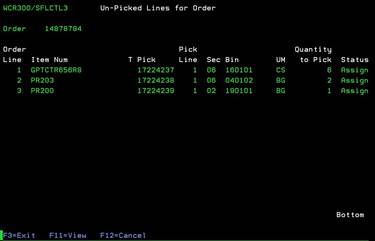
F11 -View Unpicked Line for Order
(WCR300/SFLCTL3)
1.
Menu 27,
F4, 5, ENTER, L, F11
2.
Menu 27, Shipment#, ENTER, L, F11
You may press F11 for a full view that shows the item description, quantity picked, and quantity manifested. This is a display only screen to show the items and quantities left to pick on this particular order. You can press F3 or F12 to exit this screen. Pressing F11 again will hide the descriptions, etc.