Shipment
Management (WMR139/CTL2)
Can be accessed by:
1.
Menu 27,
F4
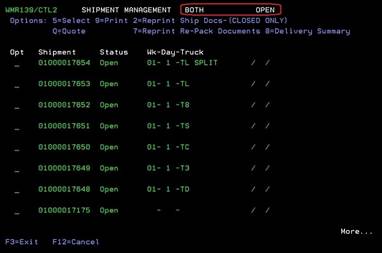
Pressing the F4 key brings up the Shipment listing according to the FILTER options you chose on the first screen. Your FILTER options are listed at the top in case you forgot which options you chose. The shipment numbers are displayed along with their current status, and Week-Day-Truck information. If it is a closed shipment, the closed date will be on the far right of each shipment.
From this screen, you can choose: (5)-Select, (9)-Print (designate printer), (2)-reprint ship docs (available for closed shipments only), (Q)-quote, (7) -reprint repack documents or (8)-delivery summary (available for closed shipments only). You can also press PAGE DOWN to view additional shipments.
Status options are:
· Open -shipment open to process
· Scanning -items are being picked/scanned
· Closed -items have been sent out
· ASN Sent -items have been sent out
· EDI forms to customer have been sent