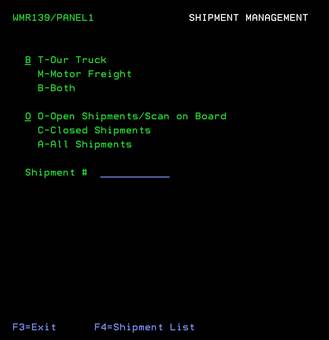
Shipment Management (WMR139/Panel1)
Can be accessed by:
1.
Menu 27
You can use this selection to maintain the status and details of a specific shipment by entering (or looking up) the Shipment Number. Use of this screen is recommended when investigating Orderfilling (Menu 16) issues. It provides a LIVE status of order status while going through the Picking/Shipping Process. If needing to view shipment status only, the quicker view would be to use Shipment Inquiry, Menu 28.
From this screen, you can FILTER the shipments shown or you can view them all. You can choose: (T)-OUR TRUCK shipments, (M)-MOTOR FRT shipments or (B)-Both shipment types. You can also choose: (O)-open shipments/scan on board, (C)-closed shipments or (A)-all shipments. You can also enter the exact Shipment# that you want to see or press the F4 key to get the shipment listing based on your selections. The Shipment# and barcode can be found on the Consolidated Package Identification Label and on the Shipment Load Master Report.