New Tax Adjustment program
Menu option 6514. Also accessible from menu
option 6512.
Objective:
To perform tax adjustments on the AS400 and on Vertex. This way, the tax reports generated by both the AS400 and Vertex will match. In both reports, the tax adjustments will be identified by a ‘-‘ followed by a sequential number. For example, 14795185-1 will be tax adjustment number 1 to invoice# 14795185, and so on.
Program Tutorial:
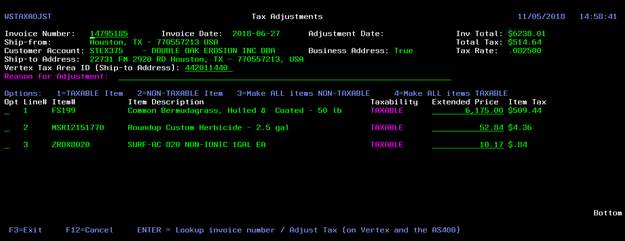
After an Invoice Number is provided, the following screen will be displayed:
(Image1)
This screen will allow you to make ALL order lines Taxable or Non-Taxable, and also make specific single lines TAXABLE or NON-TAXABLE. For other tax issues, a new extended price can be input to allow for the calculation of the desired tax amounts.
The “Reason for Adjustment” field is mandatory and should be filled out, before the order is sent for adjustment or the program will not let you continue and will display an error message instead. This justification will be displayed on the order notes of 1910 (Order Inquiry) and will also be used to track the different possible scenarios for tax adjustments.
If there is a need to correct the customer’s address, a new Vertex Tax Area ID should be provided and will be used for the tax calculation with the proper rates for the address the ID refers to.
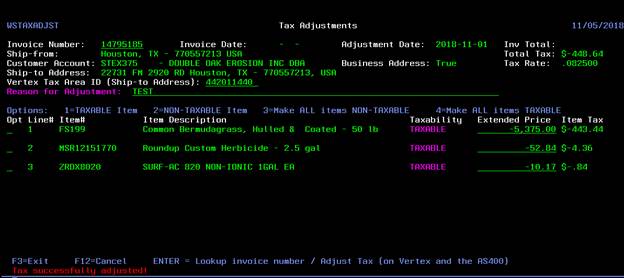
Once all this information is filled out, you press ENTER and the new tax will be saved to Vertex and the AS400. The first time (in the day) an adjustment is performed, it might take a few seconds for a response to be returned from Vertex as a connection with the Vertex server needs to be established. Subsequent tax adjustments for the day should be quicker. If the tax was adjusted successfully, a message saying “Tax successfully adjusted” will be displayed. Otherwise, an error message will be displayed.
IMPORTANT:
When an adjustment is made, the original tax information stored on Vertex will be reversed first and then the adjustment will be saved to the Vertex database.
For example, suppose invoice# 14795185 (Image1) should not have been charged tax. To fix that, you should make all the invoice items NON-TAXABLE and press ENTER. The program will first send a transaction to Vertex on the amount of $-514.64 for the current period, to reverse the original tax amount of $514.64 that is on Vertex. Then, the program will send another transaction to Vertex containing the adjustment and will record a $0.00 tax for the current period on Vertex and the AS400. So, the final result will be:
invoice# 14795185 à $-514.64 on Vertex only for the current period;
invoice# 14795185-1 à $0.00 on Vertex and the AS400 for the current period;
A REVERSAL TRANSACTION WILL
ALWAYS BE SENT TO VERTEX, BEFORE THE NEW TRANSACTION WITH THE ADJUSTMENT IS
PROCESSED. The sum of the amounts in the original transaction and the reversal
transaction is $0.00.
EXCEPTION:
For most cases, just making order lines TAXABLE or NON-TAXABLE should do it for adjustments. In cases of partial tax adjustments, it will be necessary to adjust the line items Extended Price, in order for the tax to be adjusted properly.
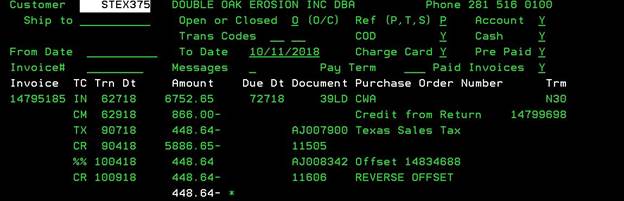
For example, invoice#14795185 (Image1) was initially charged tax in the amount of $514.64. There was a credit memo#14799698 (Image2) for the return of products in the amount of $-66.00. At this point, all these transactions were recorded on Vertex. Later on, it was found out that the whole original invoice should not have been charged tax to begin with. So, how do you record the $-448.64 difference on Vertex?
(Image2)
In scenarios like this, it will be necessary to change the Extended Price (total price) for each one of the order lines and resend the transaction to Vertex with the correct price amounts in order for the tax adjustment to be recorded properly on Vertex.
As shown on Image3, the Extended Price on all lines of the original invoice# 14795185 have to be made negative and the correct Extended Price has to be input for proper tax calculation. So, considering the credit memo was for a price adjustment, which was originally charged $6,175.00 and then adjusted to $5,375.00, the amount of $5.375,00 must be input in the Extended Price field of the line item that had a price adjustment. The data to be sent to Vertex for adjustment will look like this:
(Image3)
So, in Vertex the transactions that will be recorded are:
Invoice#14795185 à $-514.64 Tax Reversal in the current period (Since the original tax charged and recorded on Vertex for the invoice is $514.64. The sum of the amounts in the original transaction and the reversal transaction is $0.00.)
Invoice#14795185-1 à $-448.64 New Tax amount recorded for the current period due to the adjustment
Credit Memo#14799698 à $-66.00 Tax recorded in the period the credit memo was invoiced.