Customer Credit Inquiry- (ARR184/SCREEN1)
Can be accessed by:
1. Menu 1931, F4 customer# lookup, C
2.
Menu
1932, F4 customer# lookup, C
3.
Menu
6210, F4 customer# lookup, C
4.
Menu
6211, F4 customer# lookup, C
5.
Menu
6213, F4 customer# lookup, C
6.
Menu 6640
Menu 6920, F4 customer# lookup, C
The Customer Credit Inquiry screen will provide a comprehensive customer credit information. From this menu option, you can see: open invoices, view invoice details (including line items ordered), purchase order history and item details. From the main screen, you can search for customer# by pressing (F4)-Prompt in the first open field, or simply type the desired customer# and press ENTER.
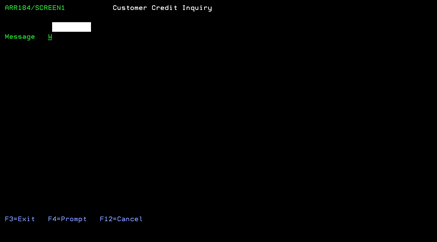
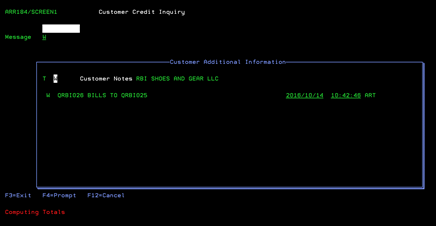
If
you selected a customer using the F4 lookup and press ENTER, you will see the
pop up screen below with “W” notes listed (if any exist in customer
maintenance) and the notation that the system is “COMPUTING TOTALS”. Press ENTER to continue. If no pop up box appears (because no “W”
notes exist), the Credit Inquiry screen will automatically appear. Notes are maintained in Customer File Maintenance
see Menu 6210 for more details.
If
you entered a customer number, instead of using the lookup, you can choose
which opening notes to choose from. The system default for Menu Option 6640 is
“W” notes. You can choose from:
·
“A”-special ship/delivery instructions with invoices
·
“D”-discontinued list customer(can buy discontinued inv)
·
“E”-exclude cust from being reported to credit agencies
·
“K”-Scotts key account
·
“S”-Pop up note displayed at Order Entry
·
“W”-Pop up note displayed on 6640 as default
·
“X”-trading partner number
·
“Y”-Syngenta green trust program(Avendra/CCA)
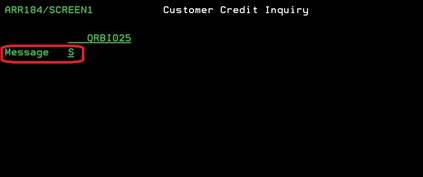
If
the notes pop up box does not appear (because selected notes don’t exist), the
Credit Inquiry screen will automatically appear. Notes are maintained in Customer File Maintenance see Menu 6210 for more details.